ERP 客製 UOFX 簽核箱
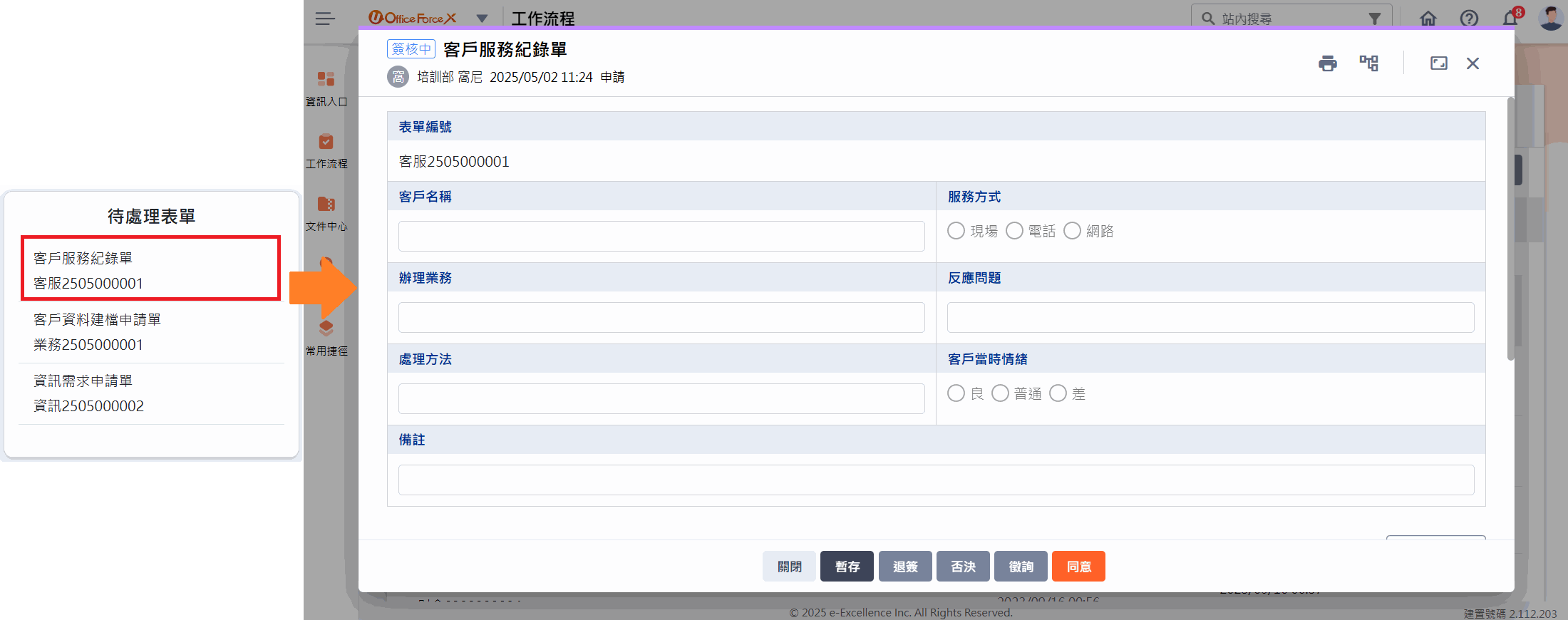
「維護表單」功能用於讓外部系統可以取得已申請、待處理及可申請的表單,並可透過 SDK 將表單作廢。亦可搭配「Url 登入」功能,自動登入 UOFX 並直接開啟對應表單,讓 ERP 系統與 UOFX 無縫整合。 以下會展示一個應用情境:「ERP 客製 UOFX 簽核箱」,並提供具體的實作步驟與方法作為參考。
應用情境
企業過去在 ERP 系統內管理申請表單時,需手動查閱 BPM 系統的簽核狀態,或切換至 BPM 介面進行相關操作,流程繁瑣且容易導致延誤或遺漏。
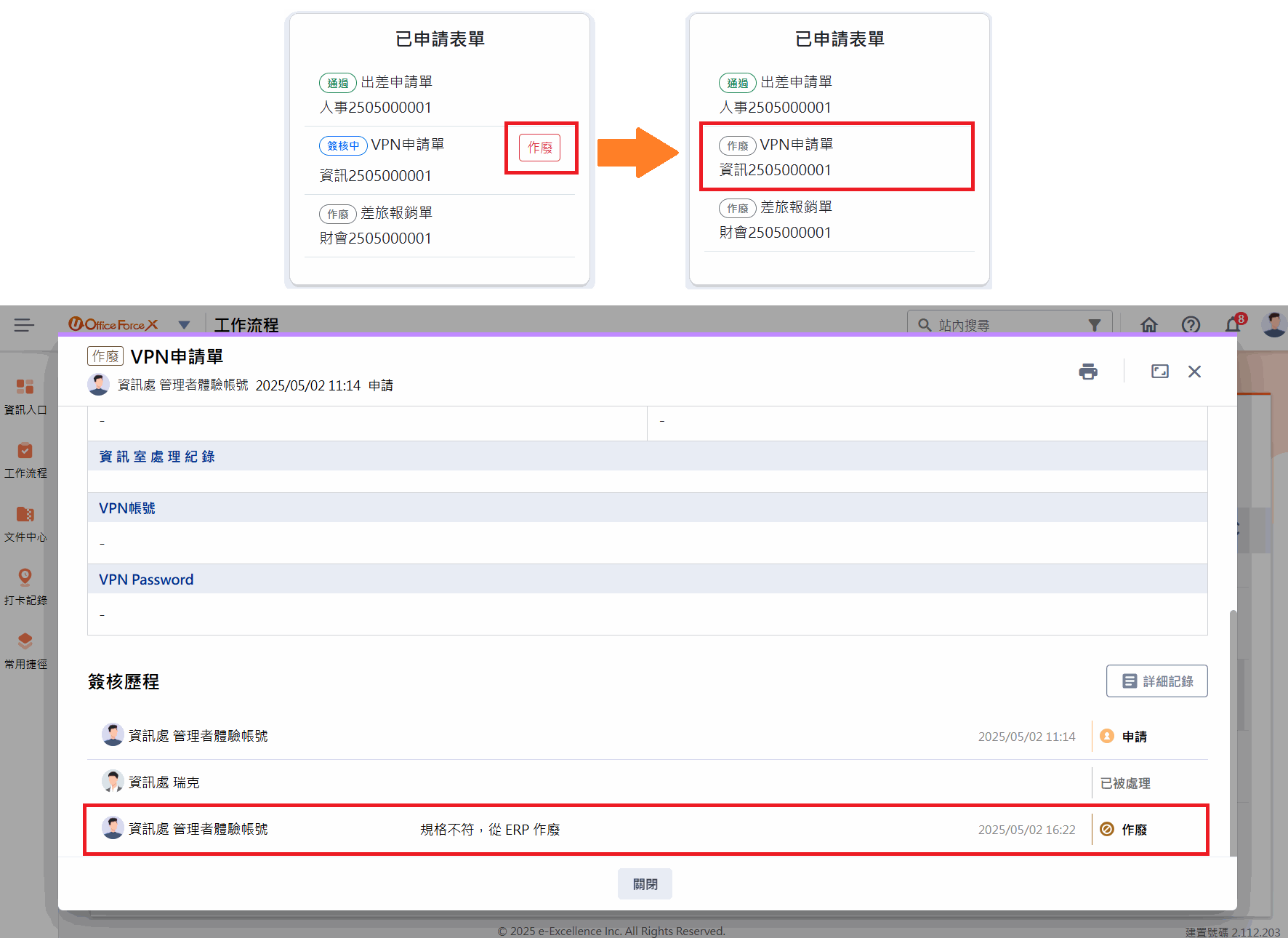
透過 UOFX 的「維護表單」與「Url 登入」功能,ERP 系統可直接查看 UOFX 內表單,並提供作廢與自動登入功能,使流程更加順暢且資訊即時同步。 ERP 系統的首頁面板中可以看到 UOFX 中可申請、已申請與待處理三種狀態表單,當使用者點擊面板中的表單時,系統將透過 URL 登入機制,自動登入 UOFX 並開啟對應表單,無須額外登入,此外,亦可透過 SDK 直接作廢 UOFX 中的表單,提升使用體驗與作業效率。
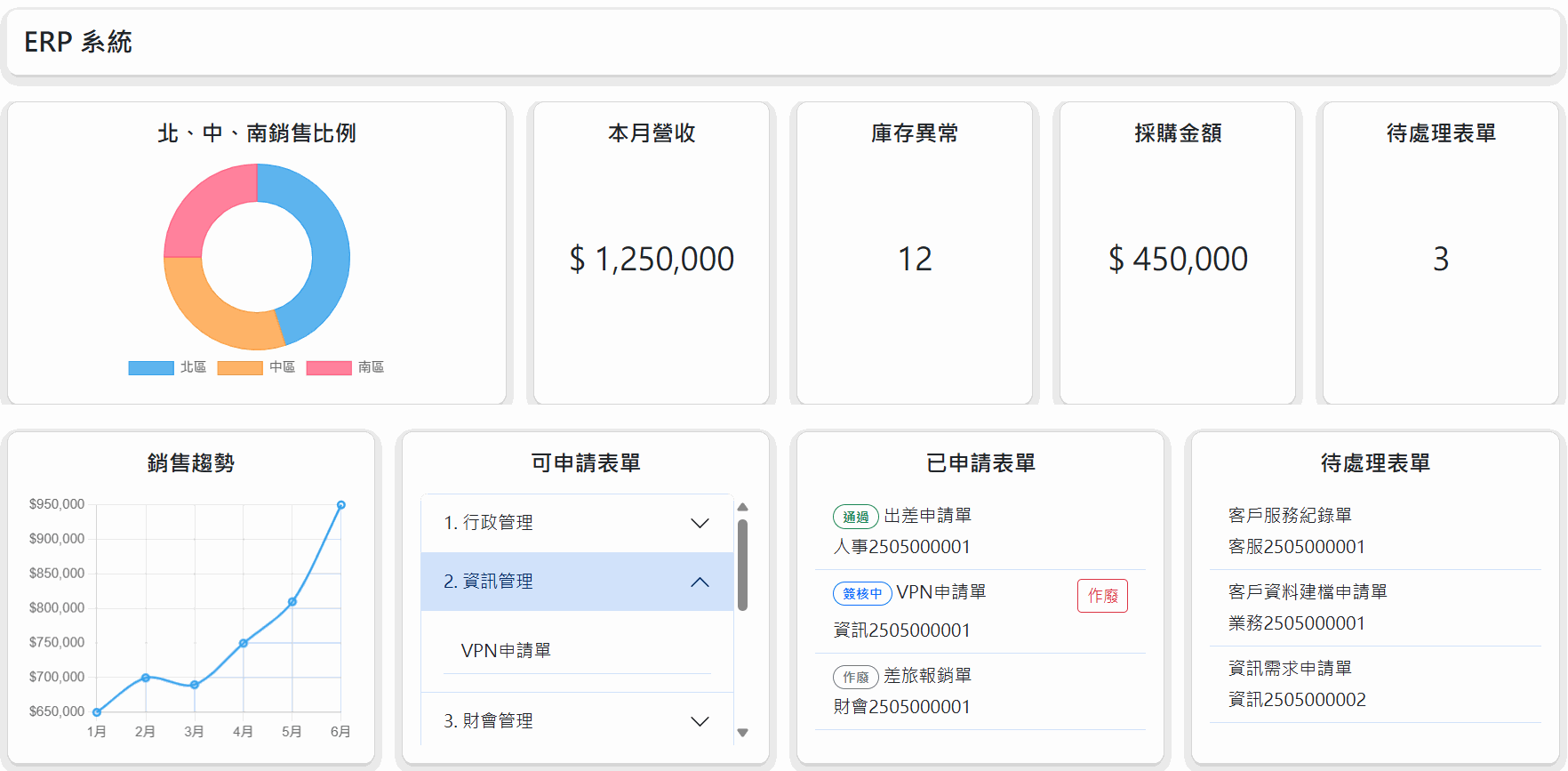
UOFX 與 ERP 整合優勢
- 流程透明:可於 ERP 系統隨時查閱簽核進度,確保流程順暢並有效控管。
- 自動登入:使用者無須重新登入 UOFX,提升使用者體驗。
- 直接作廢表單:可透過 SDK 直接作廢 UOFX 內的表單,無需進入 UOFX 操作,提高作業效率並確保數據同步。
啟動專案
在繼續往下說明之前,請確認您下列事項皆已經準備完成:
- 已取得 UOFX
站台網址 - 已取得
金鑰
範例程式碼:UOFX-SDK-Training
完成以下步驟後,即可啟動專案觀看成果,下方 實作 會對程式碼進行逐步說明:
- 設定 applicationUrl
- 設定金鑰、站台網址
設定 applicationUrl
下載範例程式碼後,請先至 launchSettings.json 中的 http 設定 applicationUrl,並選擇 http 方式啟動專案
{
  ...
  "profiles": {
    "http": {
      "commandName": "Project",
      "dotnetRunMessages": true,
      "launchBrowser": true,
      "applicationUrl": "<您的 IP 位址>:5115",
      "environmentVariables": {
        "ASPNETCORE_ENVIRONMENT": "Development"
      }
    },
    ...
}
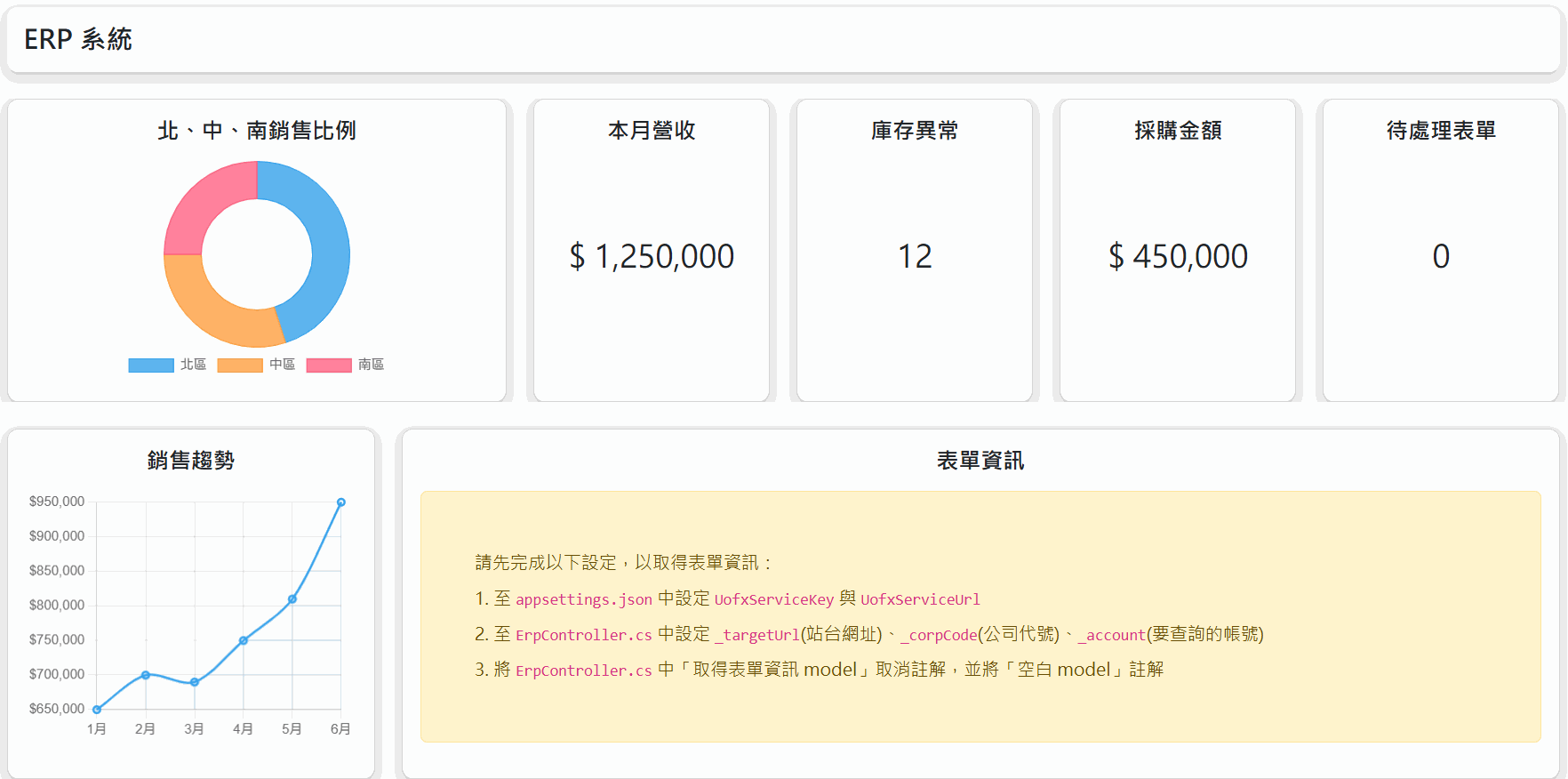
成功啟動專案後會看到以下畫面
設定金鑰、站台網址
接著我們進行以下設定,以顯示表單資訊
A. 設定 appsettings.json
分別將金鑰與站台網址填入 appsettings.json 中的 UofxServiceKey 與 UofxServiceUrl 中
"UofxServiceSettings": {
  "UofxServiceKey": "xxx",
  "UofxServiceUrl": "https://myuofx.com.tw/demo"
}
B. 設定取得表單相關資訊
- 在
ErpController中設定_targetUrl(站台網址)、_corpCode(公司代號) 與_account(要查詢的帳號) - 將 Panel() 中的「取得表單資訊 model」取消註解,並將「空白 model」註解
namespace Url_Login_Sample.Controllers
{
    public class ErpController : Controller
    {
        ...
        private static string _targetUrl = "https://myuofx.com.tw/";
        private static string _corpCode = "_corpCode";
        private static string _account = "_account";
        ...
    }

    public async Task<IActionResult> Panel()
    {

        /// <summary>
        /// 取得表單資訊 model
        /// 請確保以下事項已完成,即可將下方程式取消註解,取得 UOFX 表單資料
        /// 1. 已於 appsettings.json 中設定 UofxServiceKey 與 UofxServiceUrl
        /// 2. 已設定上方 _targetUrl(站台網址)、_corpCode(公司代號)、_account(要查詢的帳號)
        /// 3. 將下方空白 model 註解
        /// </summary>
        // 取得可申請表單
        var canApply = await UofxService.BPM.GetAllCanApplyForms(_account);

        // 取得 3 年內表單
        var since = DateTimeOffset.Now.AddMonths(-36);
        var until = DateTimeOffset.Now;

        // 取得已申請表單前 100 筆資料
        var applyForm = await UofxService.BPM.SearchFormByApply(new SearchFormByApplyReqModel
        {
            Account = _account,
            Since = since,
            Until = until,
            Order = TaskListOrder.ApplicantDate,
            By = OrderBy.Descending
        });

        //取得待處理表單前 100 筆資料
        var awaitingForm = await UofxService.BPM.SearchFormByAwaiting(new SearchFormByAwaitingReqModel
        {
            Account = _account,
            Since = since,
            Until = until,
            Order = TaskListOrder.ApplicantDate,
            By = OrderBy.Descending
        });

        var model = new ErpPanelViewModel
        {
            allCanApplyForm = canApply,
            applyForm = applyForm,
            awaitingForm = awaitingForm,
            IsRequired = true
        };

        /// <summary>
        /// 空白 model,若已完成設定,請將下方註解
        /// </summary>
        //var model = new ErpPanelViewModel
        //{
        //    allCanApplyForm = new AllCanApplyFormViewModel
        //    {
        //        CategoryList = Enumerable.Empty<FormCategoryViewModel>(),
        //        FormList = Enumerable.Empty<ApplyTaskViewModel>()
        //    },
        //    applyForm = new SearchByPage<SearchFormByApplyResultModel>
        //    {
        //        PageInfo = new PageInfoModel(),
        //        Items = Enumerable.Empty<SearchFormByApplyResultModel>()
        //    },
        //    awaitingForm = new SearchByPage<SearchFormByAwaitingResultModel>
        //    {
        //        PageInfo = new PageInfoModel(),
        //        Items = Enumerable.Empty<SearchFormByAwaitingResultModel>()
        //    },
        //    IsRequired = false
        //};

        return View(model);
    }
}
設定完成並重新啟動站台後,會看到帶有表單資訊的畫面
UOFX 設定 URL 登入
新增一個「URL登入驗證」,可參考:URL 登入驗證設定
Note
- 顯示名稱必須與
ButtonClick中的urlLoginName相同 - Hash Key 必須與
ErpController中的_HashKey相同 - Callback URL 必須設定為
Callback()的網址
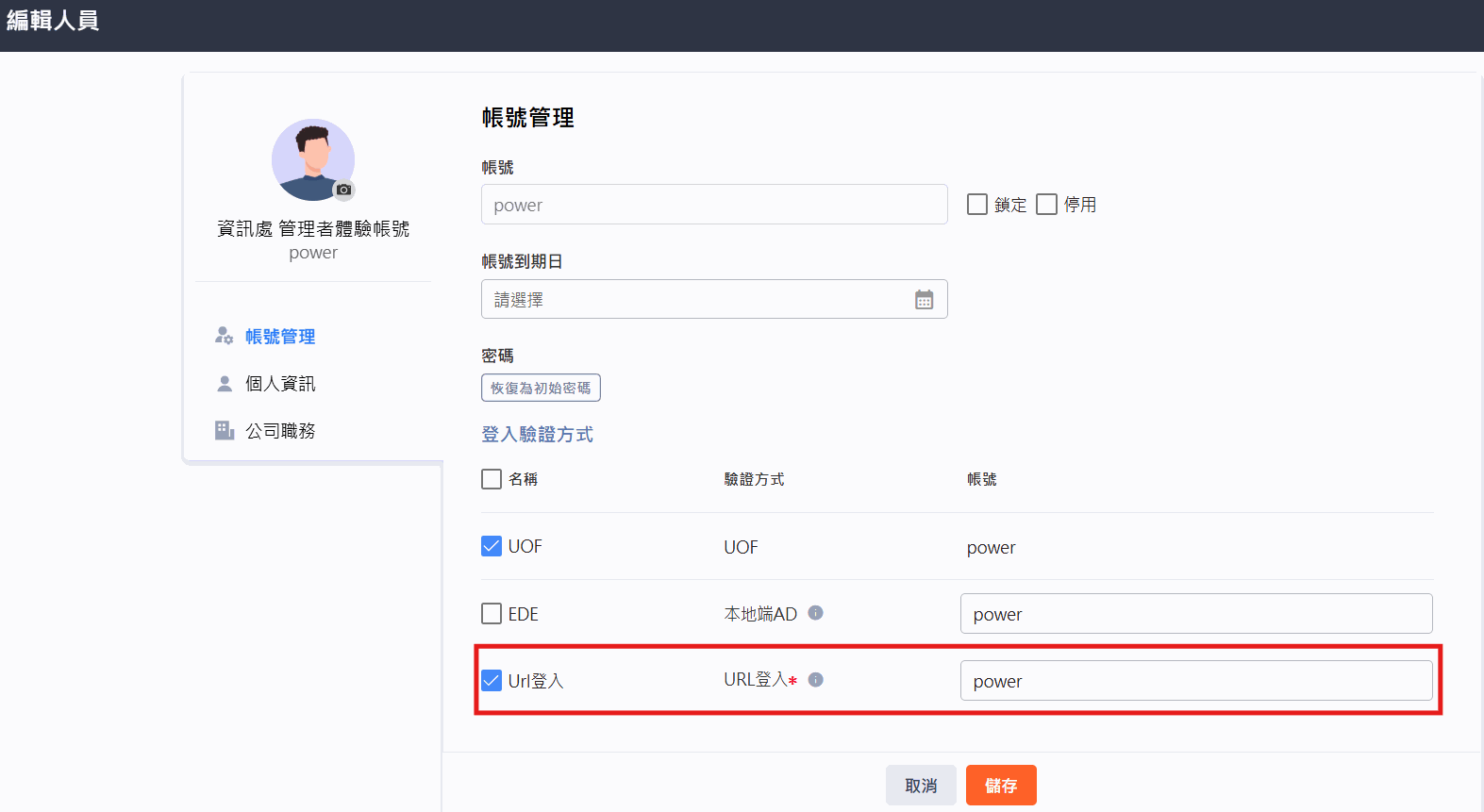
接著到「組織人員維護」,並進到欲顯示該人員表單資訊的「編輯人員」畫面,勾選「URL登入」並填入帳號
Note
帳號需與 ErpController 中的 _account 相同
實作
以下為此情境的實作步驟:
- 建立模擬 ERP 系統畫面
- 取得表單資料並顯示
- 設定點擊表單後連結到 UOFX
- 成果展示
建立模擬 ERP 系統畫面
A. 刻一個 ERP 系統畫面
先建立一個面板頁面,放上示意資料並保留空白的區域,後續將用來顯示 UOFX 中的表單資料
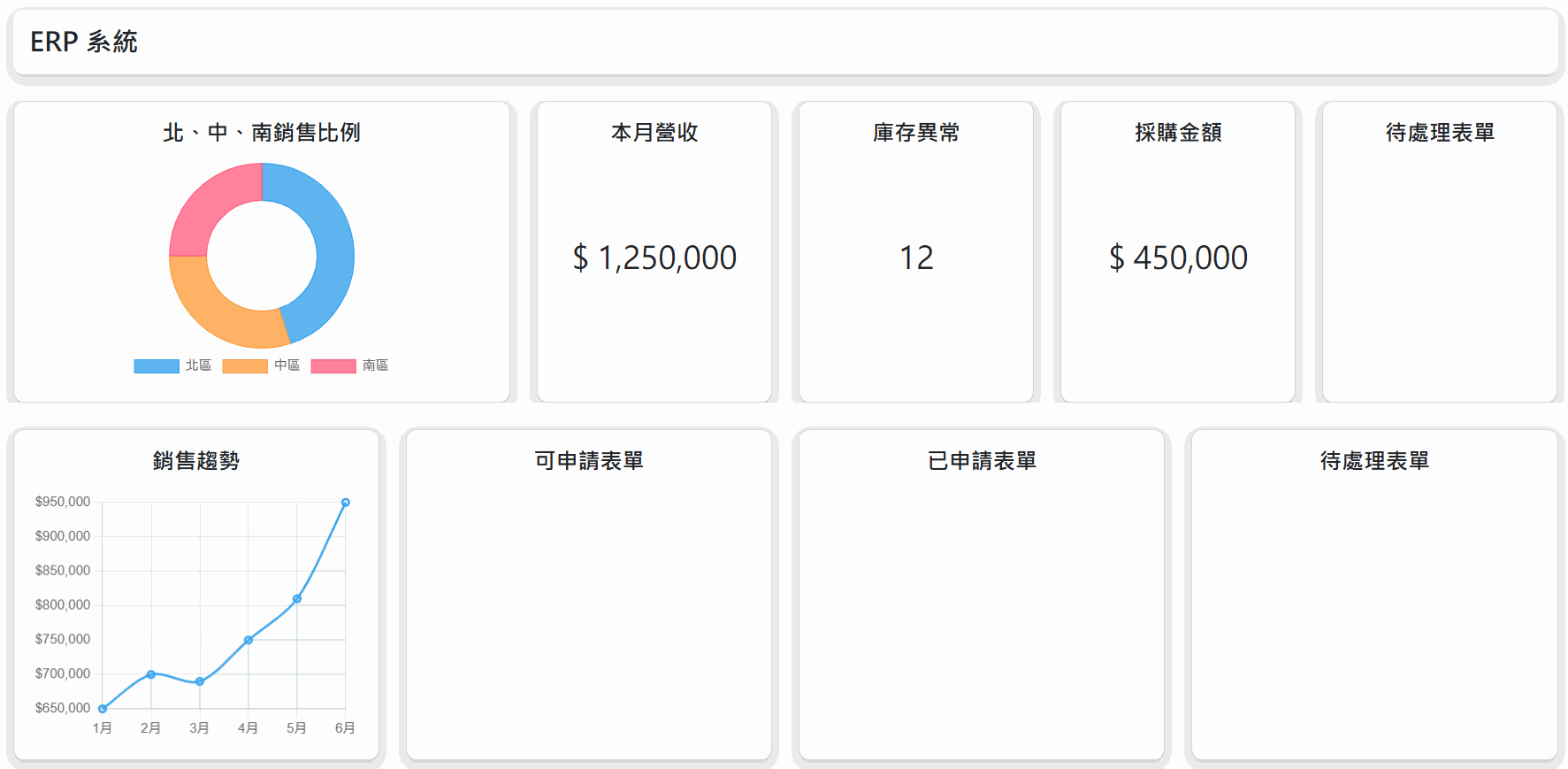
@{
    ViewBag.Title = "ERP 系統";
    Layout = null;
}

<!DOCTYPE html>
<html>
<head>
    <meta charset="UTF-8">
    <meta name="viewport" content="width=device-width, initial-scale=1.0">
    <title>@ViewData["Title"]</title>
    <link href="https://cdn.jsdelivr.net/npm/bootstrap@5.3.0/dist/css/bootstrap.min.css" rel="stylesheet">
    <style>
        /* body 樣式 */
        body {
            background-color: #f0f0f0;
            padding: 10px;
            height: 100vh;
        }

        /* 設定最大寬度 */
        .container-fluid {
            max-width: 1440px;
        }

        /* 標題列樣式 */
        .header-card {
            background-color: white;
            padding: 15px;
            border-radius: 10px;
            box-shadow: 0 4px 6px rgba(0, 0, 0, 0.1);
        }

        /* 標題樣式 */
        .header-title {
            font-size: 24px;
            font-weight: bold;
            margin: 0;
        }

        /* 卡片樣式 */
        .card {
            border-radius: 10px;
            box-shadow: 0 4px 6px rgba(0, 0, 0, 0.1);
            height: 100%;
        }

        /* 卡片標題 */
        .card-title {
            font-weight: bold;
            text-align: center;
            margin-bottom: 15px;
        }

        /* 第二行卡片內容高度 */
        .card-second-height {
            height: calc(100vh - 480px);
        }

        /* 螢幕寬度 >= 768px 設定 max-height-md 樣式 */
        @@media (min-width: 768px) {
            .max-height-md {
                max-height: 300px;
                overflow-y: hidden;
            }
        }

        /* 銷售比例圖樣式 */
        .donut-container {
            display: flex;
            justify-content: center;
            align-items: center;
            height: 200px;
        }

        /* 銷售趨勢圖樣式 */
        .chart-container {
            position: relative;
            width: 100%;
        }

        /* 異常樣式 */
        .exception {
            color: #6f42c1 !important;
            border-color: #6f42c1 !important;
        }
    </style>
</head>
<body>
    <div class="container-fluid">
        <!-- 標題列 -->
        <div class="header-card mb-4">
            <h1 class="header-title">ERP 系統</h1>
        </div>

        <div class="d-flex flex-column flex-fill">
            <!-- 第一列卡片 -->
            <div class="row mb-4 max-height-md">
                <!-- 銷售比例圖(示意資料) -->
                <div class="col-md-4">
                    <div class="card">
                        <div class="card-body">
                            <h5 class="card-title">北、中、南銷售比例</h5>
                            <div class="donut-container">
                                <canvas id="salesRatioChart"></canvas>
                            </div>
                        </div>
                    </div>
                </div>

                <!-- 本月營收(示意資料) -->
                <div class="col-md-2">
                    <div class="card">
                        <div class="card-body">
                            <h5 class="card-title">本月營收</h5>
                            <div class="d-flex justify-content-center align-items-center h-75">
                                <h3 id="monthlyRevenue">$ 1,250,000</h3>
                            </div>
                        </div>
                    </div>
                </div>

                <!-- 庫存異常(示意資料) -->
                <div class="col-md-2">
                    <div class="card">
                        <div class="card-body">
                            <h5 class="card-title">庫存異常</h5>
                            <div class="d-flex justify-content-center align-items-center h-75">
                                <h3 id="inventoryIssues">12</h3>
                            </div>
                        </div>
                    </div>
                </div>

                <!-- 採購金額(示意資料) -->
                <div class="col-md-2">
                    <div class="card">
                        <div class="card-body">
                            <h5 class="card-title">採購金額</h5>
                            <div class="d-flex justify-content-center align-items-center h-75">
                                <h3 id="purchaseAmount">$ 450,000</h3>
                            </div>
                        </div>
                    </div>
                </div>

                <!-- 待簽表單 -->
                <div class="col-md-2">
                    <div class="card">
                        <div class="card-body">
                            <h5 class="card-title">待處理表單</h5>
                            <div class="d-flex justify-content-center align-items-center h-75">

                            </div>
                        </div>
                    </div>
                </div>
            </div>

            <!-- 第二列卡片 -->
            <div class="row flex-grow-1">
                <!-- 銷售趨勢圖(示意資料) -->
                <div class="col-md-3">
                    <div class="card">
                        <div class="card-body">
                            <h5 class="card-title">銷售趨勢</h5>
                            <div class="chart-container card-second-height">
                                <canvas id="trendChart"></canvas>
                            </div>
                        </div>
                    </div>
                </div>

                <!-- 可申請表單 -->
                <div class="col-md-3">
                    <div class="card">
                        <div class="card-body">
                            <h5 class="card-title">可申請表單</h5>

                        </div>
                    </div>
                </div>

                <!-- 已申請表單 -->
                <div class="col-md-3">
                    <div class="card">
                        <div class="card-body">
                            <h5 class="card-title">已申請表單</h5>

                        </div>
                    </div>
                </div>

                <!-- 待處理表單 -->
                <div class="col-md-3">
                    <div class="card">
                        <div class="card-body">
                            <h5 class="card-title">待處理表單</h5>
                            <div class="list-group list-group-flush">

                            </div>
                        </div>
                    </div>
                </div>
            </div>
        </div>
    </div>

    <!-- loaing 動畫 -->
    <div id="loading-overlay" class="position-fixed top-0 start-0 w-100 h-100 bg-dark bg-opacity-50 d-flex justify-content-center align-items-center z-3 d-none">
        <div class="spinner-border text-primary" role="status" style="width: 3rem; height: 3rem;">
            <span class="visually-hidden">Loading...</span>
        </div>
    </div>

    <script src="https://cdn.jsdelivr.net/npm/bootstrap@5.3.0/dist/js/bootstrap.bundle.min.js"></script>
    <script src="https://cdn.jsdelivr.net/npm/chart.js"></script>
    <script>
        // 產生圖表
        document.addEventListener('DOMContentLoaded', function() {
            // 銷售比例圖(示意資料)
            const salesRatioCtx = document.getElementById('salesRatioChart').getContext('2d');
            const salesRatioChart = new Chart(salesRatioCtx, {
                type: 'doughnut',
                data: {
                    labels: ['北區', '中區', '南區'],
                    datasets: [{
                        data: [45, 30, 25],
                        backgroundColor: [
                            'rgba(54, 162, 235, 0.8)',
                            'rgba(255, 159, 64, 0.8)',
                            'rgba(255, 99, 132, 0.8)'
                        ],
                        borderColor: [
                            'rgba(54, 162, 235, 1)',
                            'rgba(255, 159, 64, 1)',
                            'rgba(255, 99, 132, 1)'
                        ],
                        borderWidth: 1
                    }]
                },
                options: {
                    responsive: true,
                    maintainAspectRatio: false,
                    plugins: {
                        legend: {
                            position: 'bottom'
                        }
                    },
                    cutout: '60%'
                }
            });

            // 銷售趨勢圖(示意資料)
            const trendCtx = document.getElementById('trendChart').getContext('2d');
            const trendChart = new Chart(trendCtx, {
                type: 'line',
                data: {
                    labels: ['1月', '2月', '3月', '4月', '5月', '6月'],
                    datasets: [{
                        label: '銷售額',
                        data: [650000, 700000, 690000, 750000, 810000, 950000],
                        borderColor: 'rgba(54, 162, 235, 1)',
                        backgroundColor: 'rgba(54, 162, 235, 0.1)',
                        borderWidth: 2,
                        tension: 0.3,
                        fill: true
                    }]
                },
                options: {
                    responsive: true,
                    maintainAspectRatio: false,
                    scales: {
                        y: {
                            beginAtZero: false,
                            ticks: {
                                callback: function(value) {
                                    return '$' + value.toLocaleString();
                                }
                            }
                        }
                    },
                    plugins: {
                        legend: {
                            display: false
                        }
                    }
                }
            });
        });
    </script>
</body>
</html>
B. 設定路由
在 Program.cs 中設定路由,導向 ErpController 的 Panel
app.MapControllerRoute(
    name: "default",
    pattern: "{controller=Erp}/{action=Panel}/{id?}");
取得表單資料並顯示
A. 建立前端頁面所需的 ViewModel
在 Models 資料夾建立 ErpPanelViewModel.cs,用來接收從 Controller 傳到前端的資料
using Ede.Uofx.PubApi.Sdk.NetStd.Models;
using Ede.Uofx.PubApi.Sdk.NetStd.Models.Bpm;

namespace Url_Login_Sample.Models
{
    public class ErpPanelViewModel
    {
        public AllCanApplyFormViewModel allCanApplyForm { get; set; }
        public SearchByPage<SearchFormByApplyResultModel> applyForm { get; set; }
        public SearchByPage<SearchFormByAwaitingResultModel> awaitingForm { get; set; }
    }
}
B. 取得資料並傳給前端
分別呼叫 UofxService.BPM.GetAllCanApplyForms、UofxService.BPM.SearchFormByApply 與 UofxService.BPM.SearchFormByAwaiting 取得可申請、已申請與待處理的表單資料,並將資料傳到 Panel.cshtml
using Microsoft.AspNetCore.Mvc;
using Url_Login_Sample.Helper;
using Url_Login_Sample.Models;
using Ede.Uofx.PubApi.Sdk.NetStd.Service;
using System.Text;
using System.Text.Json;
using Ede.Uofx.PubApi.Sdk.NetStd.Models.Bpm;
using Ede.Uofx.PubApi.Sdk.NetStd;


namespace Url_Login_Sample.Controllers
{
    public class ErpController : Controller
    {
        /// <summary>
        /// Hash Key (UOFX 中設定的也要一樣)
        /// </summary>
        private readonly string _HashKey = "201N0tz3ArwcRohRoKxm8TMBdH6gT5SHJQGFWDgczRM=";

        private static readonly Dictionary<string, string> _SidMap = [];

        private static string _targetUrl = "https://myuofx.com.tw/";
        private static string _corpCode = "_corpCode";
        private static string _account = "_account";

        private readonly IConfiguration _configuration;
        public ErpController(IConfiguration configuration)
        {
            _configuration = configuration;

            // 從 appsetting.json 取得 serviceKey 與 serviceUrl
            var uofxServiceSettings = _configuration.GetSection("UofxServiceSettings");
            var _serviceKey = uofxServiceSettings["UofxServiceKey"];
            var _serviceUrl = uofxServiceSettings["UofxServiceUrl"];

            //設定金鑰
            UofxService.Key = _serviceKey;
            //設定 UOFX 站台網址
            UofxService.UofxServerUrl = _serviceUrl;
        }

        public async Task<IActionResult> Panel()
        {
            // 取得可申請表單
            var canApply = await UofxService.BPM.GetAllCanApplyForms(_account);

            // 半年前
            var since = DateTimeOffset.Now.AddMonths(-6);
            var until = DateTimeOffset.Now;

            // 取得已申請表單
            var applyForm = await UofxService.BPM.SearchFormByApply(new SearchFormByApplyReqModel
            {
                Account = _account,
                Since = since,
                Until = until,
                Order = TaskListOrder.ApplicantDate,
                By = OrderBy.Descending
            });

            // 取得待處理表單
            var awaitingForm = await UofxService.BPM.SearchFormByAwaiting(new SearchFormByAwaitingReqModel
            {
                Account = _account,
                Since = since,
                Until = until,
                Order = TaskListOrder.ApplicantDate,
                By = OrderBy.Descending
            });

            var model = new ErpPanelViewModel
            {
                allCanApplyForm = canApply,
                applyForm = applyForm,
                awaitingForm = awaitingForm
            };

            return View(model);
        }
    }
}
C. 前端顯示表單資料
在 Panel.cshtml 中使用 @Model 來取得並顯示可申請、已申請與待處理的表單資料
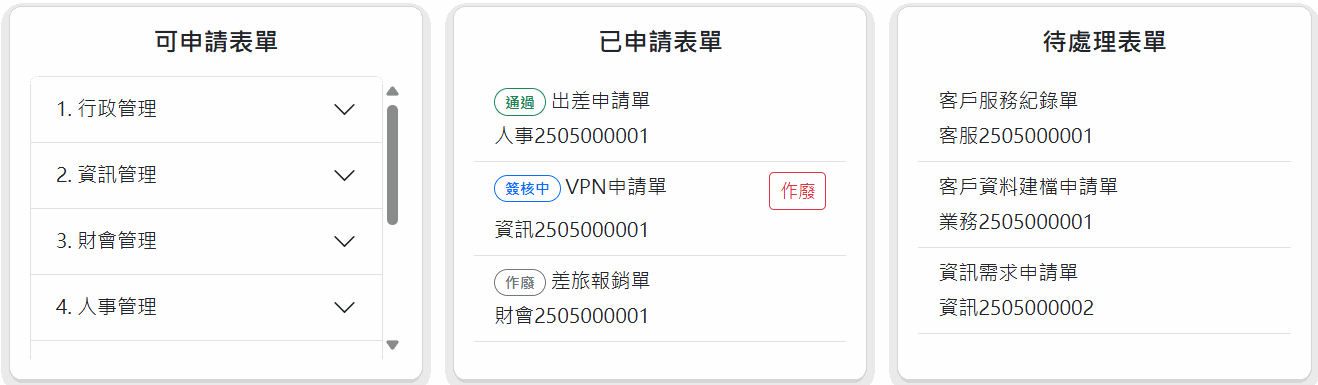
@model ErpPanelViewModel

...

<!-- 待簽表單 -->
<div class="col-md-2">
    <div class="card">
        <div class="card-body">
            <h5 class="card-title">待處理表單</h5>
            <div class="d-flex justify-content-center align-items-center h-75">
                <h3 id="pendingForms">@Model.awaitingForm.PageInfo.ItemsCount</h3>
            </div>
        </div>
    </div>
</div>

...

<!-- 可申請表單 -->
<div class="col-md-3">
    <div class="card">
        <div class="card-body">
            <h5 class="card-title">可申請表單</h5>
            @if (Model.allCanApplyForm.CategoryList != null && Model.allCanApplyForm.CategoryList.Any())
            {
                <div class="accordion overflow-y-auto overflow-x-hidden card-second-height">
                    @foreach (var category in Model.allCanApplyForm.CategoryList)
                    {
                        <div class="accordion-item">
                            <h2 class="accordion-header">
                                <button class="accordion-button collapsed" type="button" data-bs-toggle="collapse" data-bs-target="#@category.Id" aria-expanded="false" aria-controls="@category.Id">
                                    @category.Category
                                </button>
                            </h2>
                            <div id="@category.Id" class="accordion-collapse collapse">
                                <div class="accordion-body">
                                    <div class="list-group list-group-flush">
                                        @foreach (var form in Model.allCanApplyForm.FormList)
                                        {
                                            @if (@form.CategoryId == category.Id && !string.IsNullOrEmpty(form.FormCode))
                                            {
                                                <form method="post" action="/Erp/ButtonClick" target="_blank">
                                                    <input type="hidden" name="selectMagicLinkType" value="BpmApply" />
                                                    <input type="hidden" name="maginLinkPayload" value="@form.FormCode" />
                                                    <button type="submit" class="list-group-item list-group-item-action text-start border-top-0 border-start-0 border-end-0">
                                                        @form.Name
                                                    </button>
                                                </form>
                                            }
                                        }
                                    </div>
                                </div>
                            </div>
                        </div>
                    }
                </div>
            }
            else
            {
                <p class="text-center">目前沒有可申請表單</p>
            }
        </div>
    </div>
</div>

<!-- 已申請表單 -->
<div class="col-md-3">
    <div class="card">
        <div class="card-body">
            <h5 class="card-title">已申請表單</h5>
            @if (Model.applyForm.Items != null && Model.applyForm.Items.Any())
            {
                <div class="list-group list-group-flush overflow-y-auto overflow-x-hidden card-second-height">
                    @foreach (var form in Model.applyForm.Items)
                    {
                        <form method="post" action="/Erp/ButtonClick" target="_blank" id="form-@form.FormSn">
                            <input type="hidden" name="selectMagicLinkType" value="BpmSign" />
                            <input type="hidden" name="maginLinkPayload" value="@form.FormSn" />
                            <div onclick="submitForm('@form.FormSn')" style="cursor: pointer;" class="d-flex flex-column gap-1 list-group-item list-group-item-action text-start border-top-0 border-start-0 border-end-0">
                                <div class="d-flex justify-content-between gap-1">
                                    <div>
                                        <!-- 依據表單狀態設定 tag 樣式 -->
                                        @switch (form.TaskViewStatus)
                                        {
                                            case Ede.Uofx.PubApi.Sdk.NetStd.TaskStatus.Processing:
                                                <span class="badge rounded-pill border border-primary text-primary">簽核中</span>
                                                break;
                                            case Ede.Uofx.PubApi.Sdk.NetStd.TaskStatus.Complete:
                                                <span class="badge rounded-pill bg-success text-white">已結案</span>
                                                break;
                                            case Ede.Uofx.PubApi.Sdk.NetStd.TaskStatus.Approve:
                                                <span class="badge rounded-pill border border-success text-success">通過</span>
                                                break;
                                            case Ede.Uofx.PubApi.Sdk.NetStd.TaskStatus.Reject:
                                                <span class="badge rounded-pill border border-danger text-danger">否決</span>
                                                break;
                                            case Ede.Uofx.PubApi.Sdk.NetStd.TaskStatus.Cancel:
                                                <span class="badge rounded-pill border border-secondary text-secondary">作廢</span>
                                                break;
                                            case Ede.Uofx.PubApi.Sdk.NetStd.TaskStatus.Exception:
                                                <span class="badge rounded-pill border exception">異常</span>
                                                break;
                                            default:
                                                break;
                                        }
                                        <span>@form.FormName</span>
                                    </div>
                                    <!--如果可以作廢,顯示作廢按鈕-->
                                    @if (@form.AllowedToCancel)
                                    {
                                        <button type="button" class="btn btn-sm btn-outline-danger"
                                                onclick="event.stopPropagation(); cancelForm('@form.FormSn')">
                                            作廢
                                        </button>
                                    }
                                </div>
                                <div class="d-flex justify-content-between">
                                    <span>@form.FormSn</span>
                                </div>
                            </div>
                        </form>
                    }
                </div>
            }
            else
            {
                <p class="text-center">目前沒有已申請表單</p>
            }
        </div>
    </div>
</div>

<!-- 待處理表單 -->
<div class="col-md-3">
    <div class="card">
        <div class="card-body">
            <h5 class="card-title">待處理表單</h5>
            <div class="list-group list-group-flush">
                @if (Model.awaitingForm.Items != null && Model.awaitingForm.Items.Any())
                {
                    <div class="list-group list-group-flush overflow-y-auto overflow-x-hidden card-second-height">
                        @foreach (var form in Model.awaitingForm.Items)
                        {
                            <form method="post" action="/Erp/ButtonClick" target="_blank">
                                <input type="hidden" name="selectMagicLinkType" value="BpmSign" />
                                <input type="hidden" name="maginLinkPayload" value="@form.FormSn" />
                                <button type="submit" class="d-flex flex-column gap-1 list-group-item list-group-item-action text-start border-top-0 border-start-0 border-end-0">
                                    <div>@form.FormName</div>
                                    <div>@form.FormSn</div>
                                </button>
                            </form>
                        }
                    </div>
                }
                else
                {
                    <p class="text-center">目前沒有待處理表單</p>
                }
            </div>
        </div>
    </div>
</div>
設定點擊表單後連結到 UOFX
A. ErpController 設定 CancelForm()、ButtonClick()、Callback() 方法
URL 登入驗證的說明可參考設定URL登入驗證
namespace Url_Login_Sample.Controllers
{
    public class ErpController : Controller
    {
        ...

        /// <summary>
        /// 點擊作廢將表單作廢
        /// </summary>
        [HttpPost]
        public async Task<IActionResult> CancelForm(string formSn)
        {
            await UofxService.BPM.CancelTask(formSn, _account, "規格不符,從 ERP 作廢");
            return Ok();
        }

        /// <summary>
        /// 點擊按鈕後前往 UOFX
        /// </summary>
        [HttpPost]
        public ActionResult ButtonClick(HomeViewModel body)
        {
            //------------------------------------------------------
            //---             裡應隨實際需求動態調整                ---
            //------------------------------------------------------

            var uofxUrl = body.targetUrl ?? _targetUrl;  //<== 要登入的站台網址
            var uofxAccount = body.account ?? _account;         //<== 要登入的使用者帳號
            var uofxCorpCode = body.corpCode ?? _corpCode;          //<== 登入的公司代號
            var uofxUrlLoginName = body.urlLoginName ?? "Url登入";     //<==  UOFX 設定的URL登入名稱
            var magicLinkType = body.selectMagicLinkType ?? "Default"; //<== 選擇的魔法連結類型
            var magicLinkPayload = body.maginLinkPayload ?? ""; //<== 根據魔法連結所需提供的資訊

            // 產生要登入的一次性帳號識別碼並放入 Token 中, callback 時用來識別身分
            // (請依自己需求調整,但不建議把真實帳號放入 Token 中,因為 token 內容是公開的)
            var sid = GetSid(uofxAccount);

            // 產生短時效 Token (可改成使用自己製作的 token)
            var accessToken = TokenHelper.GenToken(sid, DateTimeOffset.Now.AddMinutes(5));

            // 進入 UOFX 後要前往的頁面
            MagicLinkModel target = null;

            if (magicLinkType != "Default")
            {
                target = new MagicLinkModel();
                target.Module = ModuleType.Bpm;
                if (magicLinkType == "BpmApply")
                {
                    // 轉往申請表單提供 formCode 表單代號
                    target.Action = BpmActionType.Apply;
                    target.Payload = new { formCode = magicLinkPayload };
                }
                else if (magicLinkType == "BpmSign")
                {
                    // 轉往簽核表單提供 formSn 表單編號
                    target.Action = BpmActionType.Sign;
                    target.Payload = new { formSn = magicLinkPayload };
                }
            }

            //------------------------------------------------------

            // 產生 SSO Model 並使用 Base64 編碼
            // Target = null  預設會導頁到使用者大廳
            var urlLoginModel = new UrlLoginModel()
            {
                CorpCode = uofxCorpCode,
                UrlLoginName = uofxUrlLoginName,
                Token = accessToken,
                Target = target == null ? null : JsonSerializer.Serialize(target),
                Timestamp = DateTimeOffset.UtcNow.ToUnixTimeSeconds()
            };

            var urlLoginJsonString = JsonSerializer.Serialize(urlLoginModel);
            var urlLoginBase64 = Convert.ToBase64String(Encoding.UTF8.GetBytes(urlLoginJsonString));

            // 產生 Hash
            /*
                哈希演算法:SHA-256
                金鑰哈希演算法:HMAC(Hash-based Message Authentication Code)
                編碼:使用 UTF-8 編碼將輸入字串和金鑰轉換為位元組
                輸出格式:將哈希結果轉換為十六進制字串
            */
            var hashString = HashHelper.HMACSHA256(urlLoginBase64, _HashKey);

            // 要開啟 UOFX 的 URL
            var fullUrl = new Uri(new Uri(uofxUrl), $"/UniversalLink/url?p={Uri.EscapeDataString(urlLoginBase64)}&h={Uri.EscapeDataString(hashString)}").ToString();
            return Redirect(fullUrl);
        }

        /// <summary>
        /// UOFX 登入時的 Callback 驗證 API
        /// </summary>
        [HttpGet("/url/erp/callback")]
        public ActionResult Callback()
        {
            // 從網址中接收 token 參數 (UOFX 會以 query-string 't' 傳遞過來)
            if (!Request.Query.TryGetValue("t", out var accessToken))
                throw new Exception("Token not found");

            // 驗證 Token,並從 Token 中取得 sid
            if (!TokenHelper.VirtyfyAndGetData(accessToken, out var sid))
                throw new Exception("Invalid Token");

            // 根據 sid 取得帳號
            var account = GetAccountBySid(sid);

            // 產生要回傳的 model
            var result = new CallbackResponseModel()
            {
                AccountKey = account,
                Timestamp = DateTimeOffset.UtcNow.ToUnixTimeSeconds() //務必放當下時間,會依此時間來判斷是否過期
            };

            // 使用 AES 加密 model
            /*
                加密演算法:AES(Advanced Encryption Standard)
                填充模式:PKCS7
                加密模式:CBC(Cipher Block Chaining)
                反饋大小:128 位元
            */
            byte[] aeskeyBytes = HashHelper.SHA256ToBytes(_HashKey);
            var aesKey = aeskeyBytes;   // HashKey 的 SHA256 Hash
            var aesIv = aeskeyBytes.Skip(16).ToArray(); // HashKey 的 SHA256 Hash 後 16 bytes
            var encodeResult = AesHelper.EncodeData(JsonSerializer.Serialize(result), aesKey, aesIv);

            return Ok(encodeResult);
        }

        /// <summary>
        /// 產生一次性帳號識別碼
        /// </summary>
        private string GetSid(string account)
        {
            //這只是 sample code,實務上應該更嚴謹的規畫
            var id = Guid.NewGuid().ToString();
            _SidMap.Add(id, account);
            return id;
        }

        /// <summary>
        /// 根據一次性帳號識別碼取得帳號
        /// </summary>
        private string GetAccountBySid(string sid)
        {
            //這只是 sample code,實務上應該更嚴謹的規畫
            if (_SidMap.TryGetValue(sid, out string account))
            {
                return account;
            }

            throw new Exception("Invalid Sid");
        }
    }
}
B. 前端設定 script
- 設定點擊 [作廢] 按鈕時觸發
cancelForm()方法,並傳遞表單編號呼叫 ControllerCancelForm()方法 - 設定點擊 [已申請表單] div 時,觸發 form submit,呼叫 Controller
ButtonClick()方法
...

<script>
    // 作廢表單
    function cancelForm(formSn) {
        showLoading();
        fetch('/Erp/CancelForm', {
            method: 'POST',
            body: new URLSearchParams({ FormSn: formSn })
        }).then(response => {
            if (response.ok) {
                location.reload();
            }
        })
    }

    // 顯示 loading
    function showLoading() {
        document.getElementById('loading-overlay').classList.remove('d-none');
    }

    // 隱藏 loading
    function hideLoading() {
        document.getElementById('loading-overlay').classList.add('d-none');
    }

    // 點擊已申請表單 div 時,觸發 submit
    // 因為已申請表單列表中有 button,因此使用 div 來實作 submit
    function submitForm(formSn){
        document.getElementById('form-' + formSn).submit();
    }
    ...
</script>
成果展示
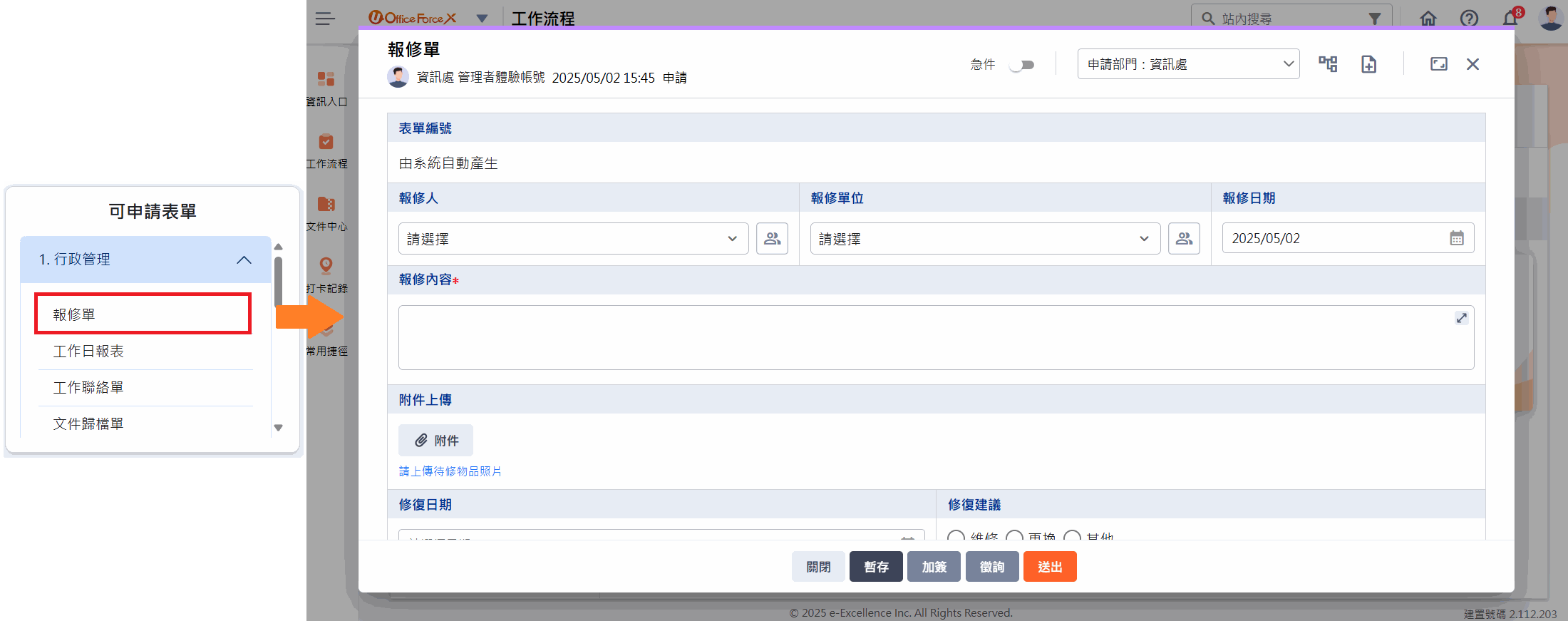
自動登入並開啟申請表單畫面
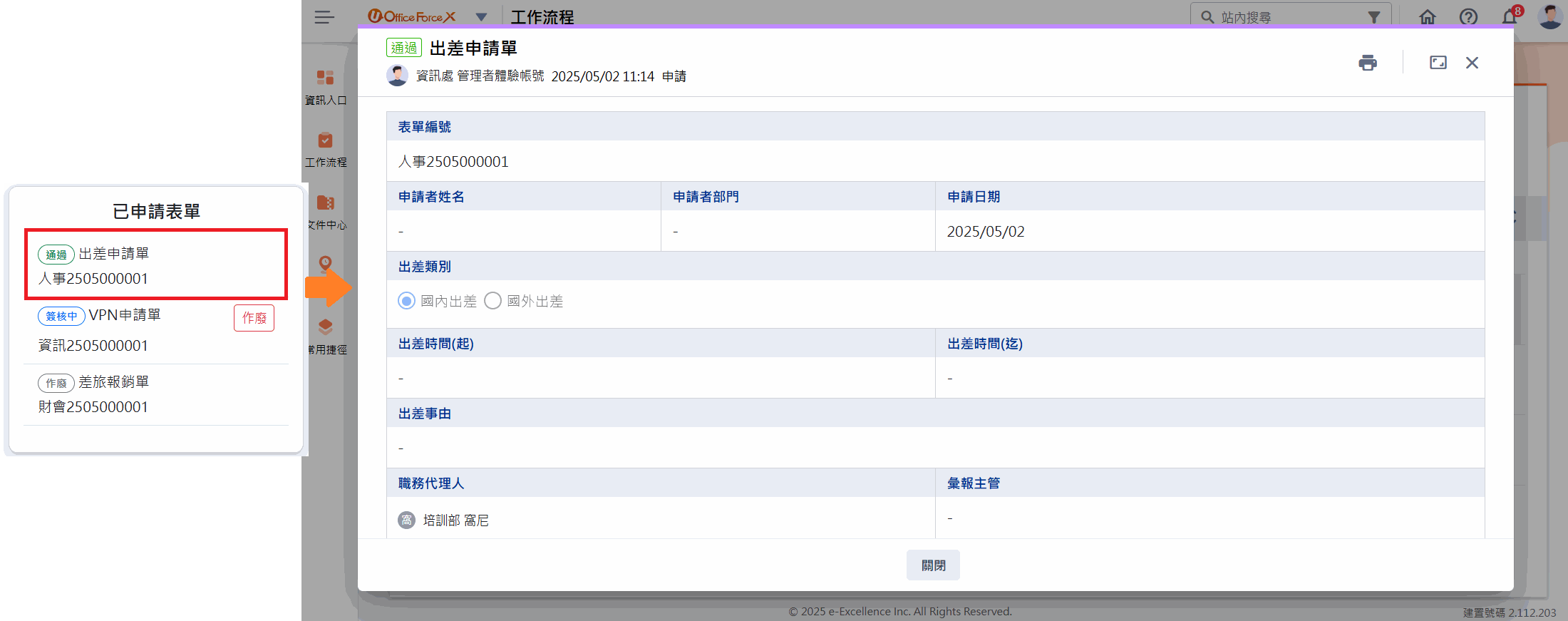
自動登入並開啟已申請表單
於外部系統直接作廢表單
自動登入並開啟待處理表單